My workflow for editorial photos of classic car shows

Just submitted some editorial photos of some classic cars to Shutterstock, thought I’d share my workflow. You can see my classic car show photos here.

Taking the photograph is of course the most important part. For classic car show photos, such as this one from last summer’s Woodward Dream Cruise:

Woodward Cruise 2013

I can easily spend 15 minutes waiting for the crowds to thin out so you can see the car itself, yet have enough people in front of it for personal interest. Funny thing is that people in the midwest are really nice so they are all trying to get out of your way so you can get the car shot, so I have to explain that I want the crowd shot…

Luckily I also like to take non-stock close up of classic car details like this one:

03 2012 Cruise 1960 Corvette side copyright

so I balance my time with those.

You are hoping for a nice day but not too sunny that it gives you harsh shadows, as I had in this photo… In taking the photo you see I have an ISO of 100 because it was a nice sunny day, and a shutter speed of 1/125 to aim for that focus at 100% magnification:
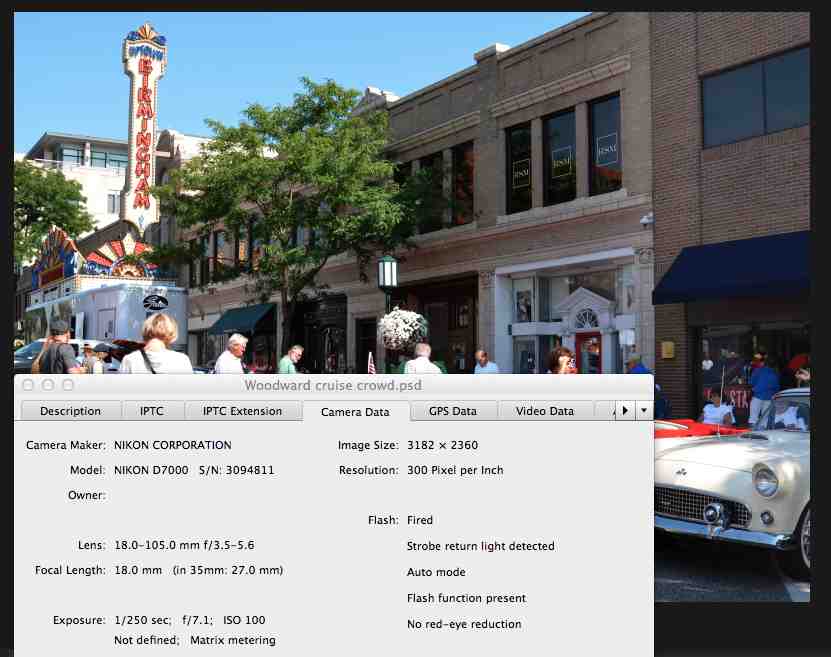
Woodward cruise info of shot

I tend to pick the shutter speed I want then adjust the exposure correction as needed if I go into shadowy areas, to get as much of the histogram covered (don’t worry if this doesn’t make sense right now).

In Photoshop I create a duplicate layer (command-J), then crop it to show the street details but keep the focus on the cars:

Woodward cruise crop

I then look at the histogram. If I have to, which I didn’t here because I had usually play with exposure when I’m taking the photo to make sure I have a good histogram in the first place, I might have to play with the edge levers to but them up to the edge of the histogram so it expands the histogram to give you the full range. Then I play with the lever in the middle to give the photo some “pop”, but you can see that would make the shadow on the right very harsh, so I “masked” the layer on the right side just by drawing on it with black pen (with maybe 10% hardness so it blends easily and shows no sharp edges) on that right side. You can see in the layer description on the bottom right, labeled “Levels 1” how it shows a screen that is all white except for that black in the right area, where I “masked” it:
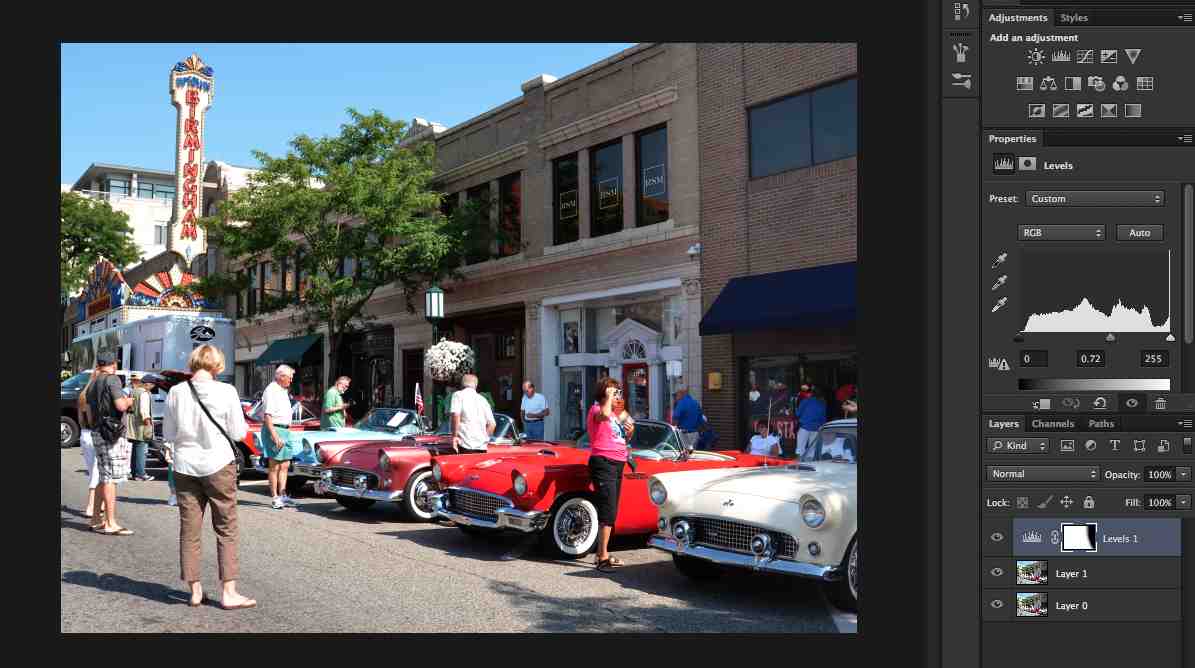
Woodward cruise histogram

Woodward cruise histogram close-up

OK, now the photo is all set, it’s time to enter the photo information. I access the “file info” from the “file” menu and enter a title, editorial headline description, keywords, and copyright information:

Woodward cruise file info

I save the file as a PSD file, then save a copy as a JPEG file, and that’s the file I submit to Shutterstock.

Hope this helped you get a sense of what to do. Questions? Ask me in the comments section.
From the beginning…

So in this section I intend to chart my continued adventures into photography. I’m starting with this post that will bring you up to date as to how I got here. You can see my suggestions in Getting Started in Stock Photography, but this is more of the personal story.

I took some photographs when I was in school, fancied myself a good photographer, submitted them to a local contest, and when I didn’t place I decided I had been wrong and should just give up. So much for my confidence in my abilities!

Flash forward 15 years later and I was that mom that took photos of everything their kids were doing, and folks would ask me to take photos of their kids and send them copies. Before a family trip to Yellowstone in 2008 my kids encouraged me to get a DSLR camera, saying it would be a shame to take a little point and shoot when I took such good photographs, so I purchased a Nikon D40, which seemed an extravagant purchase at the time. Thanks for the support, guys!

Little by little I learned how to use some of the features of my camera. I like the approach I read about in an article once. Just go along until you find that you are frustrated about some issue with your photograph, then look up that issue online and figure out what camera feature will help you fix it, and learn that feature, and so on as you demand more of your photos. That philosophy kept me from becoming overwhelmed and losing confidence. Six years later I know about ISOs, apertures, white balances, etc. It wasn’t the fastest path there, but it has served me well. I also took some online courses, and get lessons through other means, as you can see in Resources for Better Photographs.

In 2009 I took a shot at getting into Shutterstock to help me improve my photos, and with a mind to take photography beyond a hobby. In Stock Photo Submission and Tutorial you can see my progression to the current 13 stock photo sites, though most of my stock photo income comes from Shutterstock, iStockphoto and Dreamstime.

At some point Shutterstock started requiring 4 MegaPixel photos and the D40 was a 6 MegaPixel camera, meaning that I couldn’t crop very much of the photo before it wasn’t eligible, so I was ready to move on to the next camera, my current D7000, which I bought from my local camera shop, Huron Camera in Dexter, MI. The folks there have been very patient and helpful, so I try to buy big items there to help ensure they stay in business.

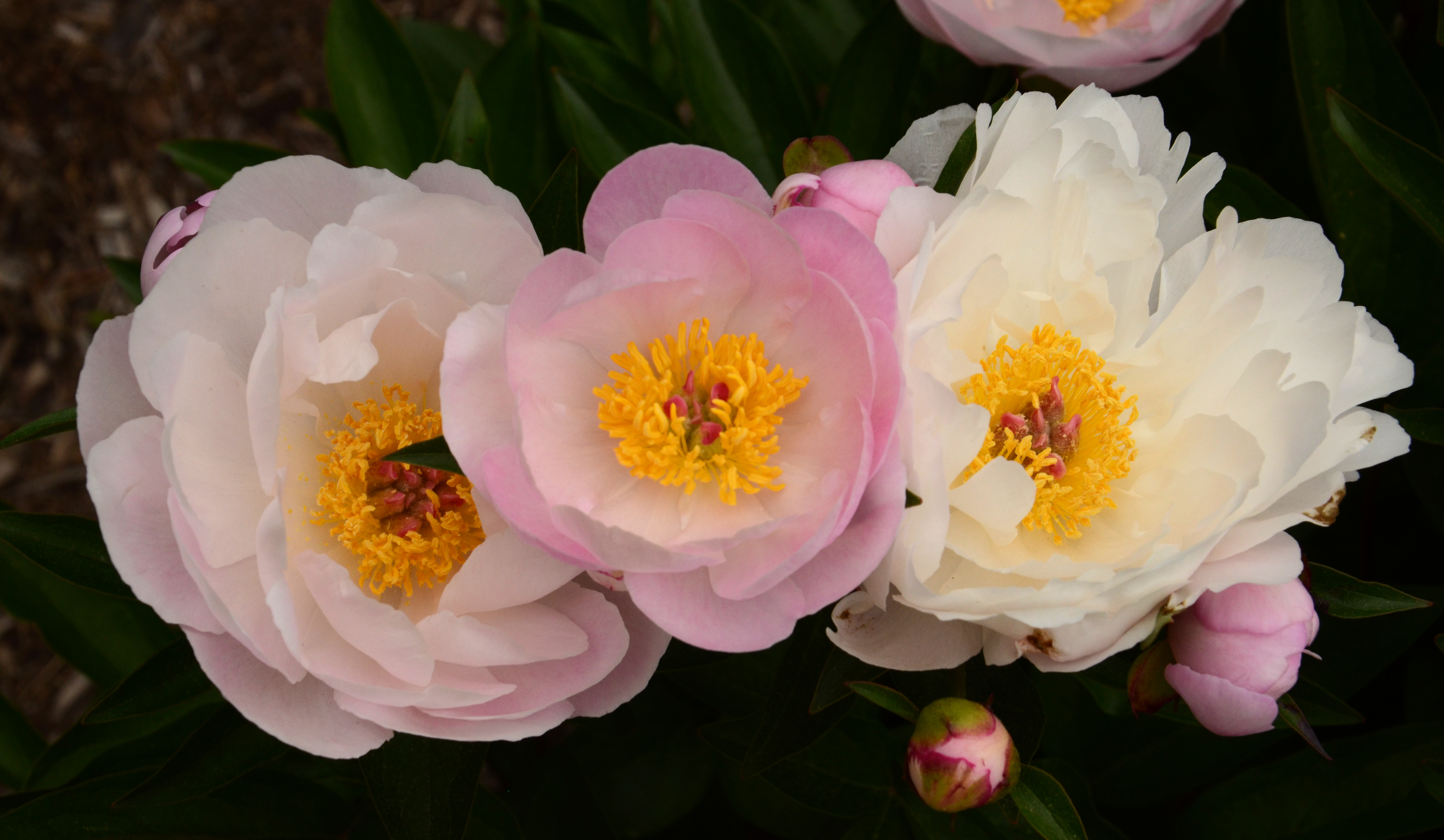
I recently attended Mike Moats Macro Bootcamp which was tremendous, I learned so much in those three days, I’ve already seen an improvement in my photos:

Matthaei peonies pink between whites

One of my passions is car details

06 2013 Cruise 1957 Chevy flames

I recently submitted a proposal to the University of Michigan Hospital’s Gift of Arts program based on these car details, so we’ll see how that goes.

OK, that pretty much brings you up to speed. I plan to keep regular posts from now on updating my progress.

Best wishes in your own adventures,

Susan

Getting business cards

I have found having business cards to be very helpful as a stock photographer. My latest version has one of my photos as the background, the URL for this blog, my Shutterstock portfolio address, and my email address, which I’ve obscured in this photo:

business card - no email

They’re useful to have when I’m photographing an event, so I can reassure people that I’m a professional, and I explain that I’m taking photos for a stock photography site. I let them know I’d be happy to send them their photo if they choose to email me, and to look for their photo in the Shutterstock site. People have invariably been very happy to have their photos taken, such as this one at last year’s civil war remembrance in Greenfield Village:

Civil-war era reenactor working on a watercolor

Or this one at last year’s Ann Arbor Mini Maker Faire:

Learning how to solder at the Ann Arbor mini Maker Faire

Now that I have this blog I’ll also be able to give it to people who ask me about stock photography.

I got them from Vistaprint, $20 for 250 nice quality cards. My earlier cards were double-sided, but I decided to have the back side blank on this new set so I can write notes on it.

Uploading your photos to stock photo websites

When you first get start you might not be comfortable with accessing your photography information, so you’ll probably upload your jpeg photo through the website’s photo loader and then enter the description, title, key words, etc. through the stock photo website itself – at least that’s how I started.

As I got more comfortable I started using a photo editor to include all the photo information within the photo file itself. Wish I’d done it sooner! It saved me loads of time because I don’t have to add all that information myself for each site, it’s part of the photo file and magically shows up when I upload the photo.

I also used to upload using the stock website’s uploaders, which sometimes can be somewhat tedious. Then I started getting more comfortable using FTP (File Transfer Protocol) to upload my photos in batches rather than individually, as you still have to do in some sites. I have found cyberduck to be a very easy to use FTP client that allows me to bookmark my sites’ FTP upload pages, including username and sometimes password, so uploading batches of photos is as easy as opening the bookmarked page and dragging the photos to the uploader.

Again, one step at a time, but trying to stay ahead of you to make your path a bit easier.

Best wishes!

Beware of copyrights and trademarks

When you shoot a non-editorial stock photo you have to be very careful to not have any copyrighted or trademarked objects in your photos. That means no logos on clothes, no easily identifiable copyrighted buildings.

I was going to write more about copyright but I noticed this great entry at Media Bakery Design that does a great job and includes a list of copyrighted work as well.

What this means in stock photography is that if there are any logos or other trademarked material in your photos you must edit them out before submission.

Note that if you plan to sell your photos for art (so NOT stock photography) that includes trademarked material that’s another story. To quote the World Intellectual Property Organization:

“Unlike copyright law, trademark law as such does not restrict the use of a trademark in a photograph. What it does forbid is the use of a trademark in a way that can cause confusion regarding the affiliation of the trademark owner to the image. If consumers are likely to mistakenly believe that the trademark owner sponsored a photograph, then there may be trademark infringement.”

Notice that this is just my understanding of it, and this is not intended to be legal advice, please do your own homework, laws do change…

iStockphoto submission page and training manual

It took me years of trying before I finally got into iStockphoto, but it was definitely worth it! They currently make up 28 % of my monthly sales.

Read their training manual very carefully and heed it. Then get inspired by their most downloaded photos. I wrote “inspired” on purpose, don’t be intimidated, everyone started out not knowing how to do this, and take one step at a time…

Be very careful about the photos you submit. If you don’t get in at first they might make you wait a month to try again, and if that doesn’t work, the wait to try again could be a year! I got two year-long waits before I got in! After that just about all the photos that got into Shutterstock got into iStockphoto. iStockphoto also generates lots of sales from their partner pages, which just boosts your income, awesome.

When you are ready to submit your photos, head over to their sales page to submit your best three photos – be sure to have a good mix of photo types, and the best quality.

Good luck!

ImageCollect submission page and FAQ page

I was all excited when I got into ImageCollect, a website of celebrity photos, but I haven’t had much luck with them, probably because my celebrity list isn’t all that… Someday I’ll get a real biggie and maybe then things will turnaround for me. You can check out their most popular photos and you’ll see that nice close up photos are best.

Their FAQ page tells you a bit more about what they are looking for, including detailed guidelines as to how to caption your celebrity photos.

If you have that celebrity photo you can head over to their registration page to get started.

Good luck!

Alamy submission page and resources page

Alamy is the eleventh stock photo website I got into, in 2013, and I have yet to make a payout, but when a photo sells the commission is significant, plus they’re very easy to add to so I keep at it.

Read their excellent Resources page, with submission guidelines and even Photoshop tutorials! Then check out some of their featured photographers.

Once you are ready to submit your photos, head over to their How to Sell Your Images page and you’re ready to go!

Veer submission page and guidelines

Veer is the tenth stock photo website I got into, as part of that spurt in 2012. It has been a bit of a dud and they take forever to get back to you on acceptances, or maybe just me because I’m not a big moneymaker for them… It’s interesting to see what my most popular images are in each of the sites, there are big differences from site to site…

Read their Photographer Guidelines, with good philosophies for good stock photography.

Once you are ready to submit your photos, head over to their contributor page and you’re ready to go!

Panthermedia submission page and quality standards

Panthermedia is the ninth stock photo website I got into, also in 2012. I had nothing for a while, then an exciting sale of $12 that I thought was the start of something big, but since then not much. Their top photos page seem to include a lot of landscapes, so you nature lovers, give this one a shot.

Read their Quality Standards page, with many details as to what makes for a good stock photo

When you are ready to submit your photos, head over to their sales page and you’re ready to go! If you use this link I get a referral bonus and the pleasure of watching your progress! Thanks.

Photodune submission page and guidelines

Photodune, part of Envato Marketplaces, is the eighth stock photo website I got into, as part of that spurt in 2012.

Read their Introduction to the Marketplace for Authors, which has a particularly in-depth section on copyright. Then check their top sellers.

When you are ready to submit your photos, head over to their author page and you’re ready to go!

Deposit Photos submission page and tutorial

Deposit Photos, a German site, is the seventh stock photo website I got into, in 2012. They’re easy enough to add to, as long as I remember to change the language to English!

Check out their tutorial, a very detailed set of guidelines of what they like to see.

When you are ready to submit photos go to their registration page to set up an account and you are on your way.

Good luck!

Can Stock Photo submission page and guidelines

Can Stock Photo is the sixth stock photo website I got into, in 2012, when I decided to take the stock photo business to the next level. Not a huge income source, but it’s one of the easiest and quickest submission processes so I figure I may as well. Maybe your style will suit them better, and maybe in the future I’ll try some new styles that are more appealing to them.

Read more about them here, and get a sense of what sells by looking at their recent downloads.

When you are ready to submit photos if you would register and start submitting! It doesn’t cost you anything and I get a referral bonus and the pleasure of watching your progress! Thanks.

Learning from stock photo websites’ recommendations for contributors

Another great way to get a better sense of the expectations of stock photography sites is to check their suggestions for contributions. In Stock Photo Submission and Tutorial Pages I have an entry for each stock photo site I’m on, and within each entry I have link to that website’s suggestions for contributors. Read them over, and you’ll have a much better sense of what’s expected in stock photography.

Big Stock Photo submission page and contributor’s page

Big Stock Photo is the fifth stock photo website I got into, in Fall 2009. Their photo submission page is one of the easiest to use.

Check their contributor’s page for some great suggestions. Also check out their most popular search phrases this week.

When you are ready to submit your photos, go to their Sell Your Images page. You’ll create an account, go through their contributor tutorial, then you’ll be able to the upload area and submit ten photos for consideration.

Good luck!

Fotolia submission page and general info page

Fotolia is the fourth stock photo website I got into, in Fall 2009 – not a great money maker for me, but your style might suit them better.

You can find their general information page for photographers here. Look also at their best sellers for the month.

When you are ready to submit your photos, you can go to their sign-up page and give them a shot. Good luck!

123RF submission page and general info page

123RF is the third stock photo website I got into, in Fall 2009 – not a great money maker for me, but your style might suit them better. Check out their FAQ page and their latest uploads.

When you are ready to submit your photos, I would appreciate you using this link. It doesn’t cost you anything and I get a referral bonus and the pleasure of watching your progress! Thanks.

Dreamstime submission page and FAQ page

Dreamstime is the second page I got into, in 2009, around the same time as Shutterstock, and they currently make up about 8% of my sales. They are considered easier to get into than Shutterstock, so it might be a good starter page.

Check their guidelines, you’ll see photos only have to be 3 MegaPixels in size. Look also at their editor’s choice of best photos page

When you are ready to submit your photos, I would appreciate you using this link. If asked for a Referral ID, please use res1430553 . It doesn’t cost you anything and I get a referral bonus and the pleasure of watching your progress! Thanks.

Shutterstock submission page and guidelines

Shutterstock is the first stock photo website I got into, in 2009, and their critique forums were very helpful in teaching me about stock photography in a supportive environment. They currently result in about half of my stock photography income.

Read their guidelines carefully and follow them. Photos must be at least 4.0 Megapixels in size. They are known for being particularly picky about things being in focus. Also check out their 50 most popular photos this week.

When you are ready to submit your photos, I would appreciate you using this link. It doesn’t cost you anything and I get a referral bonus and the pleasure of watching your progress! Thanks.

Review – Ten Mistakes you are Making with your Photography

Lynford Morton is a photography coach who runs photography workshops in Washington, DC. You can download a very useful booklet from his website that reminds you of typical mistakes we can make when we are not thinking through our photographs.

I encourage you to download it and review it from time to time to check that you’re not making one or more of the 12 mistakes!