Getting model and property releases

Most of the most popular stock photos have people in them. You must have a model release for all identifiable people in your photos, unless you take an editorial photo. I by identifiable they pretty much mean that if there is a person they must have signed a model release…

You can find sample model and property releases in Shutterstock’s legal page. The trick is then getting people to sign them. Start with family and friends who are willing to be your models. My sister is game for any photos. With my sons I tend to angle the shot so their faces aren’t exposed as much, keeping in mind their photos could end up on the side of buses or on billboards. I have approached some strangers to see if they would be willing to have their photos taken, such as this cute dancing couple, and so far they have all signed, but it’s just not something I’m very comfortable with, likely one reason I have focused more on editorial.

But many people are quite comfortable doing so and are very successful, so don’t let my hesitation stop you!

Getting focus at 100% magnification

When I first started taking photographs the idea of having photos in focus at 100% magnification seemed impossible – but clearly it’s possible now… :) Some suggestions:

To check whether your photo is in focus at 100% in iPhoto, view your photo full screen and press “1” – it will magnify your photograph to 100%, so you can look around and see if your photo is in focus. To get it back to full screen press “0”. Disheartening at first, eh? No worries, you will get better.

Here are various suggestions that have helped me get to 100% – you won’t use all of them at the same time, each has their time and purpose:

Use a tripod – I use a Vanguard tripod, as recommended by the folks at Huron Camera Shop in Dexter. It is very sturdy, quite flexible, and small enough. Don’t forget to buy a ball head to go on top of it! Make sure you have turned off the vibration reduction “VR” setting of your camera, which will try to correct for motion that will no longer be there, creating its own motion, ironically enough…

Use a monopod – Sometimes a tripod is too much, so I use my monopod – it looks kind of like a cane, and you can screw your camera to it, giving you a steadier hold. Much easier to take into crowded places. Now I can take photos at 100% without the monopod, but when I started it was invaluable.

Use a fast shutter speed, at least as fast as the inverse of your focal length. So if your lens is at 100 mm focal length, shoot at 1/100 of a second or faster shutter speed. The less time the shutter is open the lower the chances that things will shake while the shutter is open. Sometimes I just run the camera on Shutter priority, increase the ISO so the camera is more sensitive to light and I won’t have to have the shutter as open, and adjusting exposure compensation to make sure I’m spanning as much of my histogram as I can. (and don’t worry if you have no idea what I just said, you’ll master ISO, exposure, histograms, just take it little by little. I took it one step at a time, you can too…)

“Roll” the shutter rather than pressing it. Don’t “click” the shutter but rather press it in a rolling motion, as if you were getting a fingerprint taken.

Set your camera on 2 sec, 5 sec, or 10 sec delay. If you’re shooting something that’s not moving, set your camera to a time delay. This way you can click the camera, wait for the camera shake to settle, then the camera takes the photo.

Use a remote shutter release. The Nikon one costs about $20 and lets you take photographs without touching the camera, reducing the camera shake.

Try some combinations of these and next thing you know your photos will be at 100% too. Have other suggestions? Include them in the comment section, thanks!

Adding keywords to your photos

So you have this awesome photos, how are buyers going to find them? Keywords are the words that buyers enter into the search field to find the photos they seek. You want to capture every reason a buyer might want your photo. For example for this photo of a middle aged woman in despair

Despair
there are many reasons a buyer might want it. If you check the keywords, they include:

woman, older, gray, hair, pain, sad, upset, sadness, aged, natural, white, middle-aged, failure, loss, frustration, adult, stress, middle, depressed, solitude, grief, forties, fifties, people, caucasian, female, distraught, anxiety, unhappy, depression, emotion, lonely, hispanic, face, problem, person, senior, outdoors, mature, loneliness, desperation, despaired, worried, fresh, single, alone

You want to have keywords that literally describe the photo, but also the emotions in it, and other related keywords.

Luckily Shutterstock has an outstanding Keywords Suggestions application that makes it easy to get additional ideas for your keywords. Simply enter some initial keywords, then click on the photos that are most similar to yours, and it will generate possible keywords for you!

Where do you enter the keywords? If you have a photo editing program you can access the photo information, with space to enter the keywords. Otherwise you can enter the information as you submit your photo. The sooner you get comfortable accessing the photo information the better, saves you load of time if you submit to multiple websites to have the keywords automatically load up along with your photo.

Preparing editorial photos

Many of the photos I take are editorial photos, which can be used for non-commercial purposes, such as for articles in magazines. The nice thing about editorial photos is that you don’t need a model release. I also have dreams of being a photojournalist, so this allows me to indulge that passion.

Some of my editorial photos are about events that happen around my hometown of Ann Arbor Michigan, such as car show photo that ended up in Fodor’s, much to my delight!

My photo in Fodor's

But sometimes I’ll take a shot of something I think might come up in articles, such as the Veteran’s hospital, which has ended up in some articles.

VA hospital photo in article
It took me a couple years to get that photo, to get just the right angle, on a nice sunny spring day for the blue sky background and with the flowers blooming….

The same rules of photography apply here, but you also have to be careful not to stage anything, and not to edit it in a way that changes the reality of what happened. Then you have to write a caption. I typically follow Shutterstock’s rules for editorial captions – they work for just about all the websites I’m on except iStockphotos, who don’t like the all capital letters.

Where do you put that caption? If you have a photo editing program you can access your photo’s information and put it in the description, along with your keywords, title, etc. That way all the information will load up automatically when you submit your photo into the stock photo website. But it that feels intimidating right now you can add it at the stock photo website after you upload your photo.

What makes for a good stock photo?

So you have been taking photographs for a while and thinking you’ll try stock photography. Now you have to think like a stock photography buyer and their needs are. Just because it’s a nice photographs doesn’t mean you’ll get accepted into stock photography sites. A good friend of mine is an amazing photographer, but the photos he takes are not ones that sell. So what sells?

Think good quality photos. See Resources for Better Photographs for ideas on how to improve your photography.

Think commercially. Photos of flowers and animals abound on stock photo sites, but those that sell are unique, such as my orca whale, shot on vacation in Vancouver:

Orca near Vancouver, BC
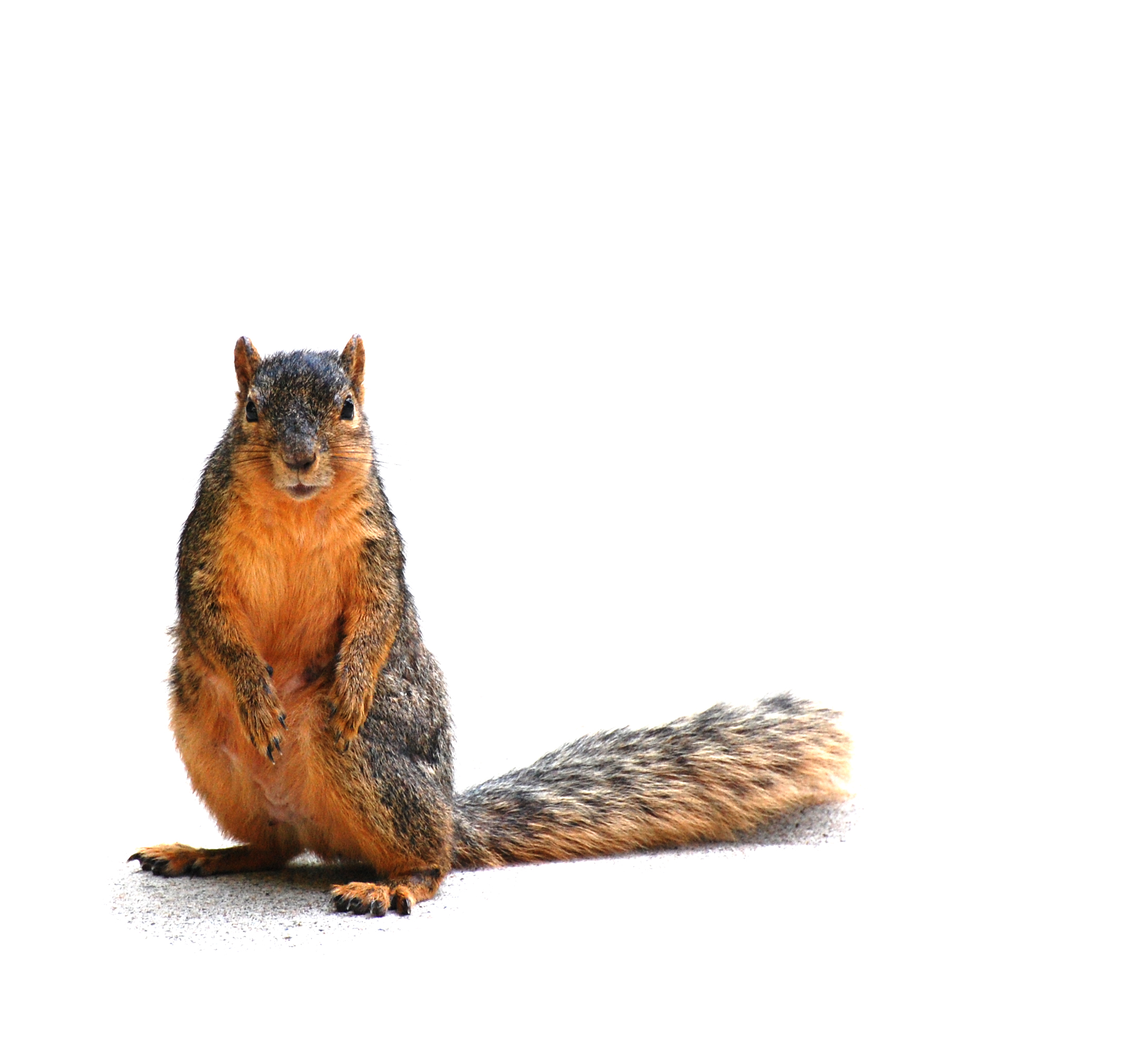
or very clean shot of unique poses, like my best selling squirrel shot.

Squirrel staring at you, on white with shadow

That one took me over an hour at the University of Michigan diag to get, total serendipity, curious squirrel on a sidewalk, and then another hour to clean it up…

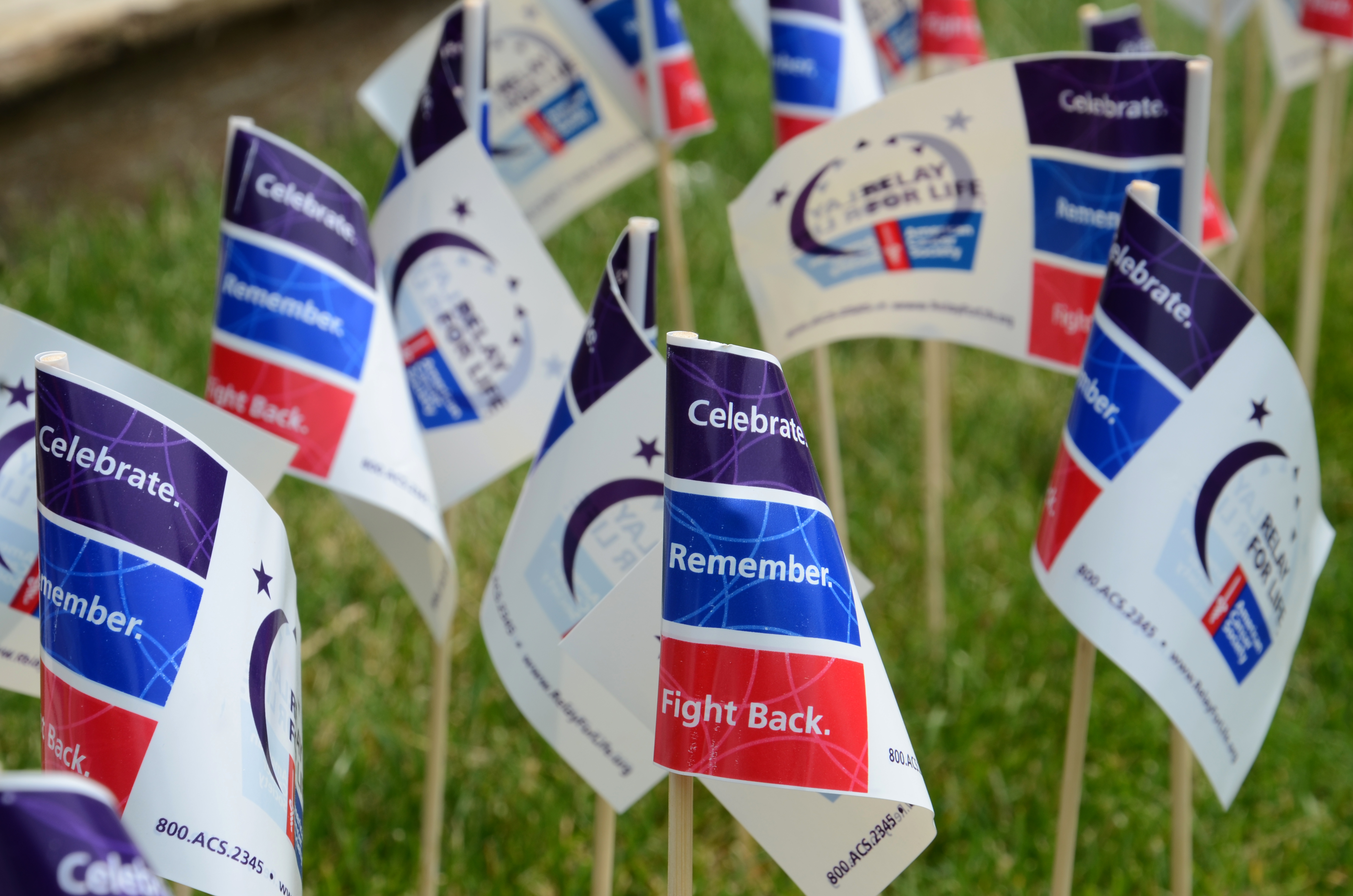
Think in terms of impact and iconic photos. I shot lots of photographs at a Relay for Life event, but you can see that the most popular ones are the close-ups of the flags, which have the most visual impact:

ANN ARBOR, MI - JUNE 22: at the  Relay for Life of Ann Arbor event on June 22, 2013 in Ann Arbor, MI.

See the Stock Photo Sightings category for more examples.

Think clean photos, without distracting backgrounds. Really look around all the edges of the photos to make sure nothing is taking the viewer away from the key message. Take another squirrel photo that sells quite well:

squirrel eating peanut

Nothing but squirrel and grass there. I even cleaned up the grass in Photoshop to make sure nothing took the viewer away from squirrel.

Think totally white background. Users of your non-editorial photos likely will want to use them in their own settings, so you need to provide them “isolated” photos, with just the object in a totally white background. You can get a quick idea of how to clean up your photos to get that background here.

Plaid gift box

Think perfect focus. People buying stock photographs might end up blowing them up a lot, so photos have to be in focus at 100% magnification. I wrote some suggestions to achieve that perfect focus here.

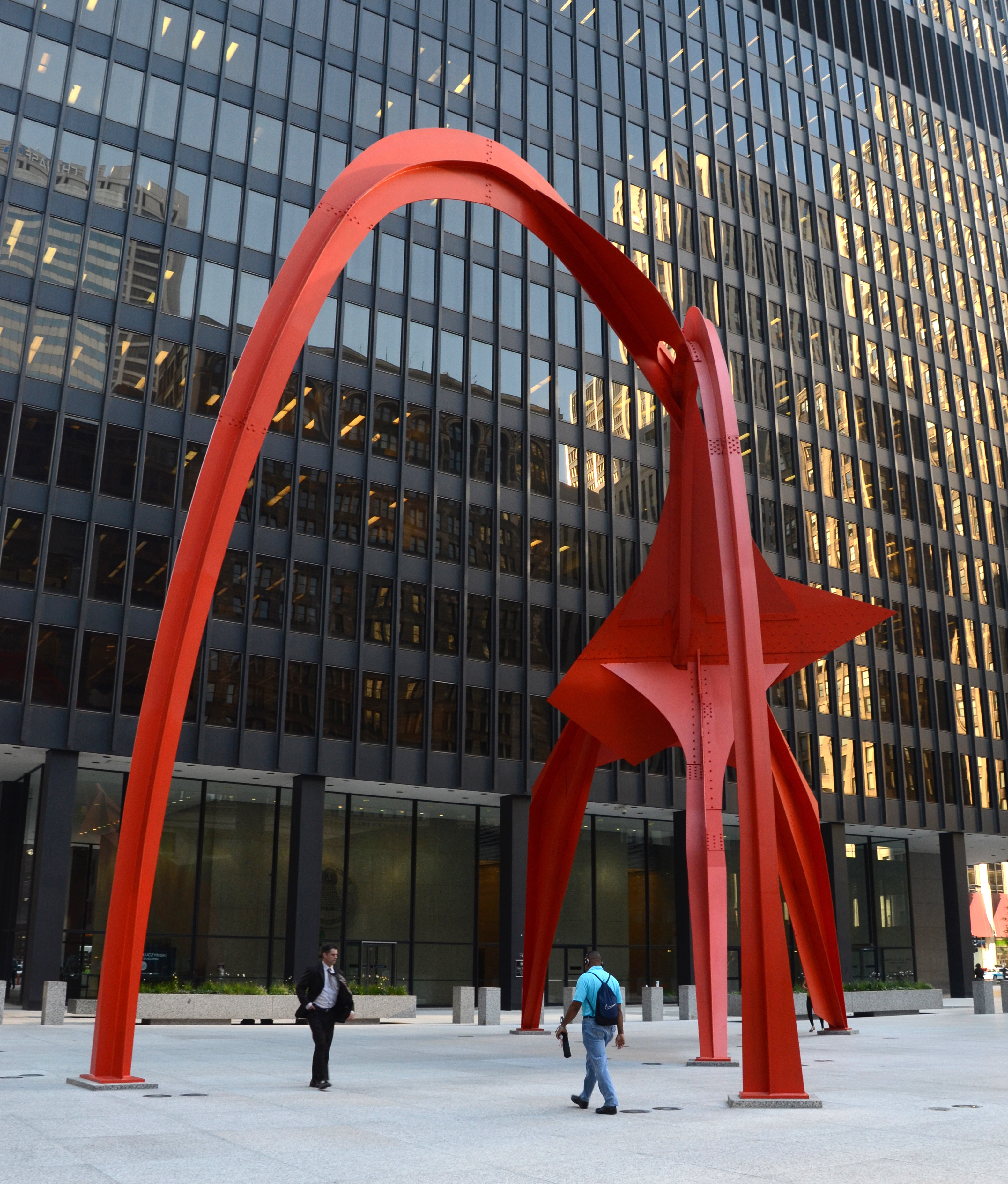
Realize it takes a lot of time to get the right photo. Take the Flamingo sculpture in Chicago:

Flamingo sculpture in Chicago

It took me over an hour and over 50 shots to get this one photo. I moved around and tried various angles to get just the right view of the sculpture, waited for enough people to be walking under it to give it a sense of proportion, yet with no one distracting from the shot. Or my best-selling Ann Arbor Art Fair photo:

Ann Arbor's South University Art Fair 2011

I stood at that spot for over 20 minutes looking for just the right shot – enough people to fill the shot, nothing distracting from the main theme, a nice couple holding hands enjoying the day…

Lots to think about, but it will come naturally soon enough. Keep in mind the saying “don’t take the shot, make the shot!”

Starter sites about stock photography to get the ball rolling

Are people telling you they like your photos and you think you might want to sell them? Consider stock photography, it’s been a fun hobby for me that slowly became more of a business for me. Check these great websites to get a general idea of how to get started:

Digital Photography School’s Shooting for Stock Photography Sites

WikiHow’s Shoot Stock Photography page

WikiHow’s Sell Stock Photography page

Lightstalking Stock Photography page

SellingGraphics.com 10 Tips How to Get Accepted by Shutterstock

Check these websites, and if you’re ready to go, read the next entries for more details of my path and how you too can become a stock photographer, and don’t intimidated. It was a very long process for me, starting in 2008, just take it one small step at a time, conquer each step as you go, don’t feel you have to know how to do everything right away. I knew close to nothing about photography and certainly nothing about stock photography when I started, so you can do it too.

Best wishes with your own adventures.

Definition of stock photography

When I tell people I am a stock photographer they usually don’t know what that means, so here’s what I tell them. When you read an article in a magazine or on the web, there is usually an accompanying photo – that photo was likely purchased from a stock photo website, such as my Shutterstock site, and photographers such as myself provide photos to the website, and get a cut when our photo is purchased.

So photos on articles are primarily editorial photos. Stock photos are also bought for commercial purposes, for use in greeting cards, billboards, within books, for t-shirts, or anything else. You can see some of the places my photos end up at Sightings of my stock photos.

Alright, you get the idea. As a stock photographer you sell people the right to use your photograph either for editorial use or for commercial purposes. Read the upcoming entries for more information on how to get started with stock photography. Then give it a shot yourself!